想查看永恆之塔2的 Ping 值,可以透過幾種方式,例如 Windows 資源監視器、第三方工具或線上 Ping 測試工具。由於玩家經常遊玩韓服和台服,掌握連線延遲是確保遊戲順暢的關鍵。
1. Windows 資源監視器(最準確)
這個方法不需要安裝額外軟體,就能即時查看遊戲的連線延遲。
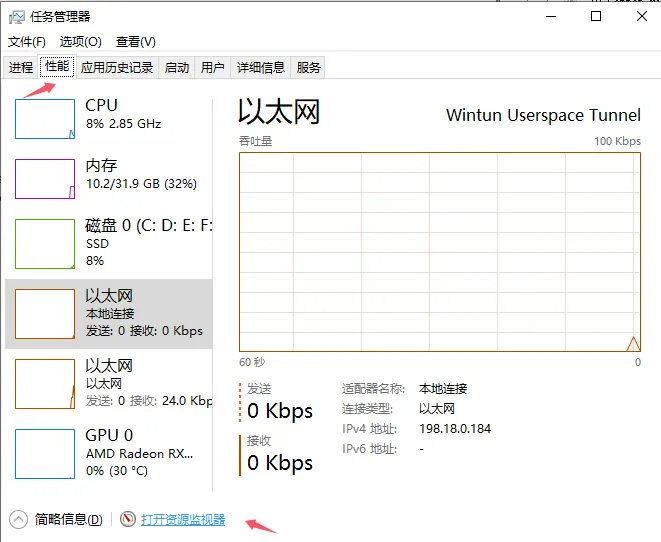
- 開啟工作管理員(Ctrl + Shift + Esc)。
- 切換至「效能」分頁,然後點選底部的「開啟資源監視器」。
- 切換至「網路」分頁。
- 在「TCP 連線」區塊中找到 Aion2.exe。
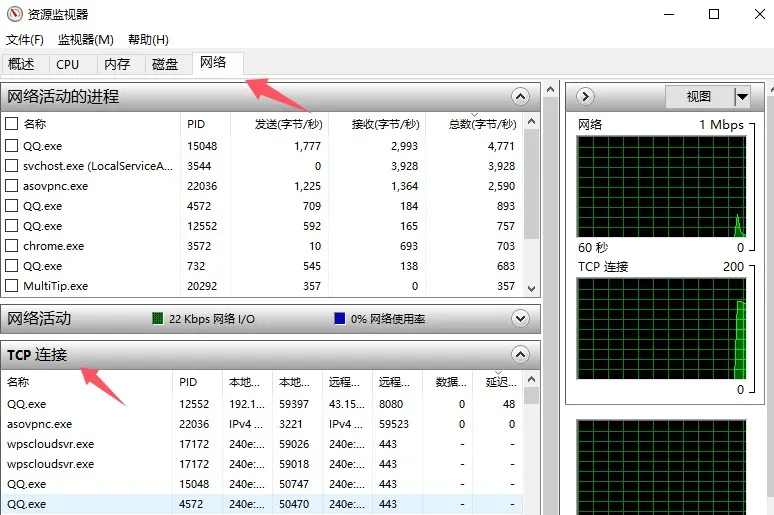
- 查看「延遲(毫秒)」欄位,確認目前的 Ping 值。
如果想提升永恆之塔2的遊戲體驗,了解自己的 Ping 值相當重要,尤其是戰鬥和移動都很講究操作時機。穩定的低延遲能讓遊戲更順暢、操作反應更即時,這對 PvE 和 PvP 都至關重要。如果你想更快升級或取得頂級裝備,又不想受到延遲影響,可以考慮使用第三方工具改善連線,或是透過 U4N 等值得信賴的平台購買永恆之塔2基納。這能讓你擁有更多遊戲貨幣來升級裝備,無論 Ping 值如何,都能保持競爭優勢。

2. 第三方遊戲加速器(遊戲內疊加顯示)
由於永恆之塔2不一定會顯示 Ping 值,有些玩家會使用第三方工具,在遊戲過程中查看延遲:
- GearUP Booster:提供快速 Ping 測試,並針對韓服和台服進行即時連線最佳化。
- ExitLag:內建「Network Analyzer」網路分析工具,可在遊玩時顯示 Ping 值。
- LagoFast:提供即時 Ping 顯示和內建效能監測功能,受到高延遲環境下的玩家歡迎。
3. 網頁版 Ping 測試
如果想在啟動遊戲前先確認 Ping 值,可以使用以下線上工具:
- GearUP 永恆之塔2 Ping 測試:直接透過瀏覽器測試你與特定地區伺服器(韓國或台灣)之間的連線延遲。
- GameServerPing:可測試多款遊戲伺服器連線品質的通用工具。
Ping 值對永恆之塔2非常重要,尤其是在戰鬥時。低延遲玩家(例如 48 毫秒)每分鐘成功打出的攻擊次數,可能比高延遲玩家(約 170 毫秒)多近 50%。高延遲也可能導致閃避和衝刺無法正常判定。