購物車空
繼續購物Forza Horizon 6 takes the series to new heights in terms of accessibility, immersion, and relaxed gameplay. One of the most exciting additions is AutoDrive, a feature that lets the game's AI take full control of your car. Unlike the “Auto-Steering” in previous titles, AutoDrive is a complete system designed not just for accessibility, but also for letting players enjoy the sights and sounds of Japan without worrying about steering, shifting, or braking.
Forza Horizon 6 includes the rich suite of accessibility features the Horizon series is known for and introduces some new options. AutoDrive can be accessed with ANNA by using the d-pad while you’re exploring Japan. Pause the game, open the map, set a waypoint to your preferred location, and use ANNA to initiate AutoDrive. Then you can sit back, relax and take in the breathtaking sights of Japan.
AutoDrive allows players to set a waypoint on the map and let the car navigate automatically to that location. You don't need to touch the controller—the AI handles everything from steering through tight corners to adjusting speed on highways. This is perfect for exploring Japan's mountains, forests, and neon-lit streets without worrying about traffic or controls.
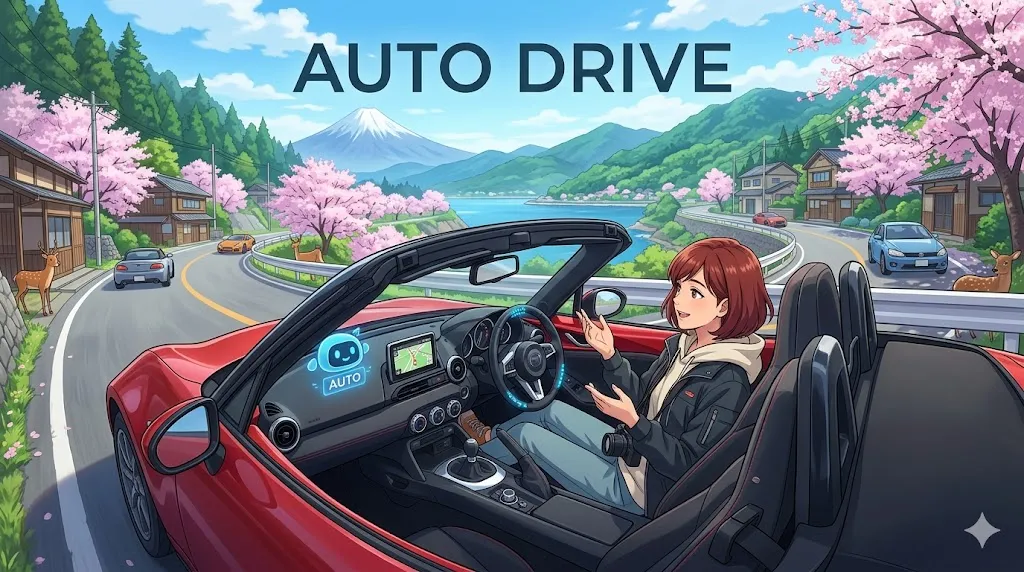
While AutoDrive is active, you can enter Cinematic Mode by pressing LB. This removes the user interface and introduces dynamic camera angles, turning your journey into a scenic road movie. It's a brilliant way to capture photos, record videos, or simply enjoy the world in a fully immersive way. The camera follows curves, zooms through vistas, and gives the player a sense of being on a professional driving tour.
AutoDrive is part of a larger suite of accessibility tools in Forza Horizon 6. Alongside features like Proximity Radar and High Contrast Mode, AutoDrive ensures that players who may have difficulty with traditional racing controls can still fully enjoy the game. This makes the open world of Japan more inclusive, letting anyone experience its scenic routes and challenges.
The Japanese setting of Forza Horizon 6 is designed to be explored. AutoDrive is perfect for taking in the environment and soundtrack without focusing on driving mechanics. Whether you want to cruise past cherry blossoms, coastal highways, or bustling city streets, AutoDrive makes it easy to enjoy every view while still feeling like part of the game world.
To use AutoDrive:
Q: How does AutoDrive work?
AutoDrive can be accessed with ANNA by using the d-pad while you’re exploring Japan. Pause the game, open the map, set a waypoint to your preferred location, and use ANNA to initiate AutoDrive. Then you can sit back, relax and take in the breathtaking sights of Japan.
For players looking to enhance their Forza Horizon 6 experience, U4N offers a reliable way to gear up quickly through the FH6 Credits shop, letting you unlock cars, upgrades, and in-game items to complement your AutoDrive adventures and fully enjoy Japan’s breathtaking roads.
Forza Horizon 6's AutoDrive is more than just a convenience—it's a way to experience the game differently. Whether you want a relaxed scenic cruise, a hands-free journey through Japan, or an accessible racing option, AutoDrive opens up new ways to play, explore, and enjoy the world at your own pace.
U4N編輯團隊由一群熱愛遊戲的分析師和技術專家組成。我們不僅是一個可靠的遊戲資產市場——我們的核心目標是通過專業內容幫助玩家。我們的團隊為一些大熱門遊戲製作詳細的攻略、經濟策略和技術問題解決方案,包括《MLB The Show 26》、《Aion 2》、《Forza Horizon 6》、《Arc Raiders》和《Path of Exile》等。
無論是掌握遊戲市場的買賣技巧,還是幫助你打造最強的遊戲角色或策略,我們發布的每一份內容都經過我們團隊的實際測試。在 U4N,我們不僅跟隨遊戲的趨勢,我們還幫助你領先一步