購物車

購物車空

繼續購物
總計 $0.00
結算
首頁 / 博客 / 極限競速:地平線6

Forza Horizon 6 Unable to Join Session: Fixes and Workarounds

作者: U4N
發佈日期: May 20, 2026
7579

One of the most frustrating moments in Forza Horizon 6 is trying to join a friend's convoy or hop into the open world, only to see the dreaded “unable to join session” or “convoy unavailable” message. This is usually caused by recent launch issues, profile desyncs, or conflicts with PC software and network protocols. Fortunately, there are several reliable steps you can take to get back online and racing.
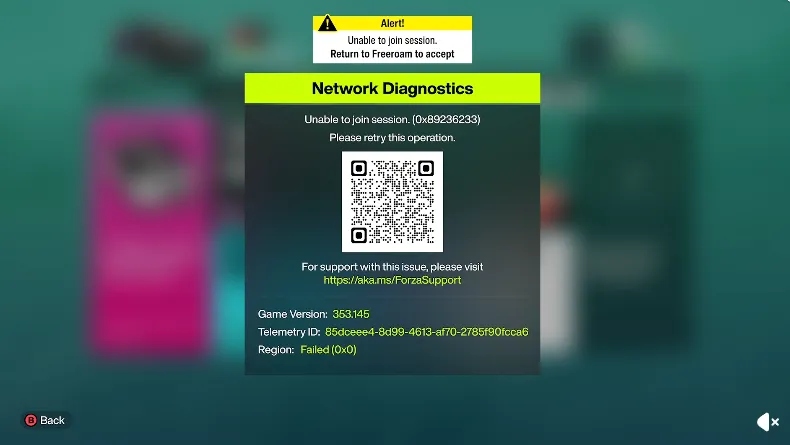
Forza Horizon 6 Unable to Join Session

1. Disable "National Instruments" Services (PC Only)

If you're on PC, certain hardware calibration tools like SimJack Pedal Calibration can interfere with online connections. These often use National Instruments (NI) code, which may prevent players from seeing anyone in the open world.

  • Open Task Manager (Ctrl + Shift + Esc).
  • Look for any processes starting with NI or National Instruments, like NI Domain Service.
  • Right-click and choose End Task.
  • For a permanent fix, open the Windows Services app, find these NI services, right-click, select Properties, and set Startup type to Disabled.

2. Resync Your Profile and Store

A “Feature Unavailable” or 0x80600460 error usually means your profile is out of sync with Microsoft servers.

  • Sign out completely of the Xbox App and Microsoft Store.
  • Close both applications.
  • Click your Windows taskbar clock → Adjust date and time → Sync now. Make sure Set time automatically is enabled.
  • Log back into your Microsoft account in both apps.

3. Clear Account Tokens and Re-authenticate

Corrupted login credentials are a common culprit blocking session connections.

  • PC: Open Credential Manager → Windows Credentials, remove any entries starting with Xbl|. Restart the game to force a fresh login.
  • Console: In-game menu → Sign Out, restart the game, then sign back in.

4. Use the Steam Overlay Workaround

Steam users sometimes encounter broken invites through the in-game menus.

  • Press Shift + Tab to open the Steam Overlay.
  • Access your Friends List, right-click a friend, and select Join Game or send an invite directly via Steam.

5. Clear DNS and Refresh Network Protocols

If network protocols are stuck, refreshing your cache can help.

  1. Open Command Prompt as administrator.
  2. Enter the following commands one by one: 
    ipconfig /flushdns
    netsh winsock reset
    netsh int ip reset
  3. Restart your PC.

6. Check Xbox Live Status and Network Settings

Even after these fixes, sometimes the issue is on Microsoft's end.

  • Verify Xbox Live Status to ensure servers are online.
  • Check NAT Type: It should be Open on Xbox; PC users need Teredo tunneling active.
  • Forward Xbox Live ports if needed: UDP 3544 and UDP 4500.
  • Make sure your date and time are set to sync automatically.

7. PC-Specific Fixes

  • Run the game as Administrator.
  • On Steam: Properties → Installed Files → Verify integrity of game files.
  • Allow the game executable through Windows Defender Firewall.

By following these steps, most players can quickly resolve the unable to join session error and get back to the open roads and mountain passes of Forza Horizon 6. Consistently keeping your profile synced, network healthy, and background software in check ensures smooth multiplayer connections and a better Horizon Play experience.

Buy Forza Horizon 6(FH6) Credits

For players looking to jump straight into multiplayer without any delays, consider marketplaces like U4N, where you can safely buy Forza Horizon 6 credits for sale. This allows you to upgrade vehicles, unlock events, and join sessions faster while avoiding common session errors tied to incomplete progress or account issues.

上一個 下一個
作者簡介

U4N編輯團隊由一群熱愛遊戲的分析師和技術專家組成。我們不僅是一個可靠的遊戲資產市場——我們的核心目標是通過專業內容幫助玩家。我們的團隊為一些大熱門遊戲製作詳細的攻略、經濟策略和技術問題解決方案,包括《MLB The Show 26》、《Aion 2》、《Forza Horizon 6》、《Arc Raiders》和《Path of Exile》等。

無論是掌握遊戲市場的買賣技巧,還是幫助你打造最強的遊戲角色或策略,我們發布的每一份內容都經過我們團隊的實際測試。在 U4N,我們不僅跟隨遊戲的趨勢,我們還幫助你領先一步

相關文章