購物車空
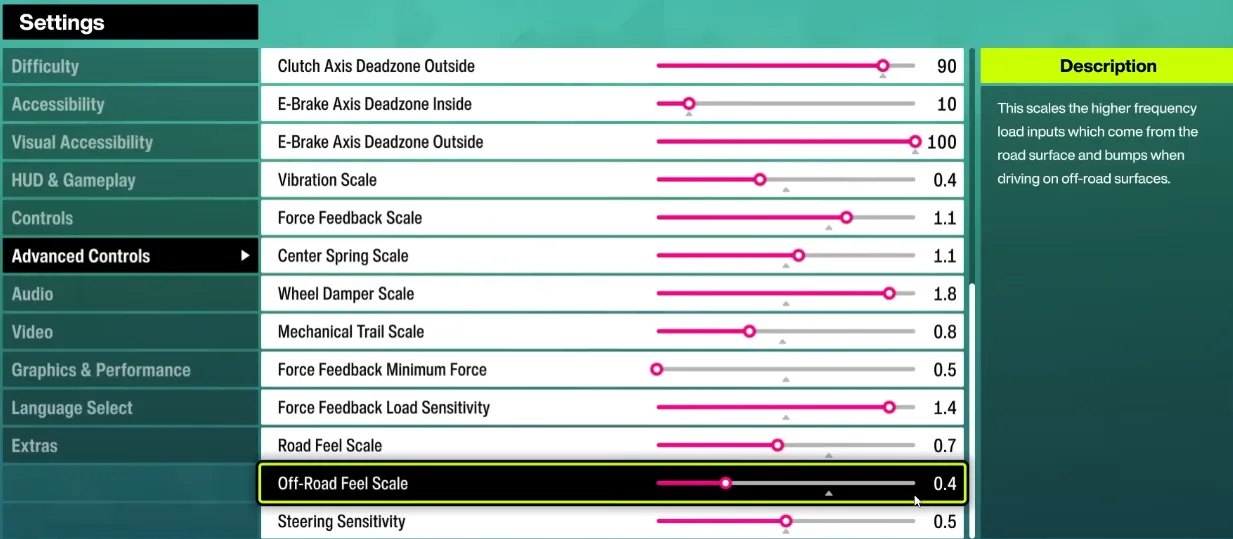
繼續購物If you want to get the most out of your wheel in Forza Horizon 6 (FH6), proper setup is essential. Players have reported that default wheel settings often lead to oversteer, spinning out, and poor alignment between wheel input and on-screen car behavior. Below is a practical guide to optimize your setup for both direct drive and belt-driven wheels like the Logitech RS50, G920/923, and Thrustmaster series.
| Setting | Recommended Range | Notes |
|---|---|---|
| Steering Sensitivity | 40–50 | Lower values give smoother control; higher values make the wheel twitchier. |
| Operating Range (Angle) | 540–720° | 540° is favored for tighter control and avoiding spinouts; 720° for more natural cockpit feel. Avoid 900°–1080° for FH6 unless you want delayed responses. |
| Dampener | 0–35 | Reduces oscillations; 0 for a sharper feel, 30+ for smoother, slower steering return. |
| Strength / Torque | 5–8 Nm | Max strength helps sense car weight; too high can be fatiguing. Adjust to wheel type. |
| Force Feedback Filter | 1–8 | Low for sharper feedback; higher filters reduce small vibrations and noise. |
| Auto Force Feedback Filter | Off | Manual control is recommended for fine-tuning FH6 feel. |
Tip: Adjust one setting at a time and test in a safe environment to find your personal sweet spot.
Steering linearity controls how the wheel's rotation maps to the car's turning:
Check alignment by slowly turning the wheel in first-person view. The in-game steering should match your real-world input.

By carefully adjusting these parameters, FH6 wheel users can enjoy a smoother, more controllable experience. The goal is control over raw force, letting you confidently take sharp turns without spinning out.
If you want to skip trial and error and get fully optimized credits and items in FH6, you can visit U4N, a trusted platform to quickly buy safe Forza Horizon 6 credits, letting you upgrade cars and experiment with setups without worrying about grind time.
U4N編輯團隊由一群熱愛遊戲的分析師和技術專家組成。我們不僅是一個可靠的遊戲資產市場——我們的核心目標是通過專業內容幫助玩家。我們的團隊為一些大熱門遊戲製作詳細的攻略、經濟策略和技術問題解決方案,包括《MLB The Show 26》、《Aion 2》、《Forza Horizon 6》、《Arc Raiders》和《Path of Exile》等。
無論是掌握遊戲市場的買賣技巧,還是幫助你打造最強的遊戲角色或策略,我們發布的每一份內容都經過我們團隊的實際測試。在 U4N,我們不僅跟隨遊戲的趨勢,我們還幫助你領先一步