購物車空
繼續購物If you're diving into the Auction House in Forza Horizon 6 and hitting walls like black screens, grayed-out menus, or transaction failures, you're not alone. Many players face these issues, and most can be resolved with some simple steps.
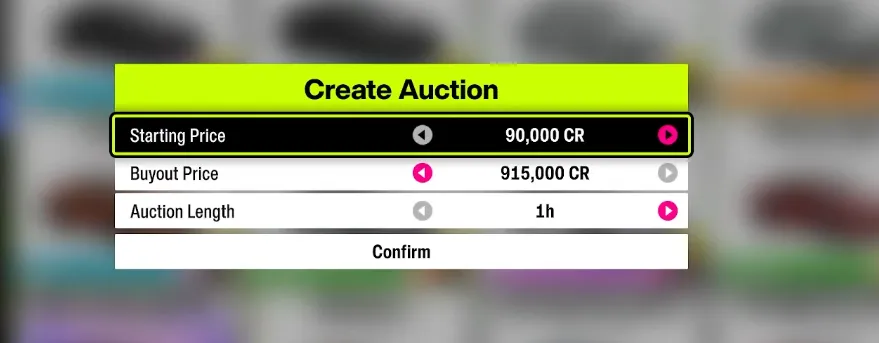
Sometimes, when you try to view a car listing, the game freezes on a black screen or an infinite loading screen. The trick here is not to fully enter the listing:
From the pop-up menu, you can Bid, Buy Out, or Claim Car/Credits directly. This bypasses the bug that crashes or freezes the full auction page.
Tip: Avoid pressing 'A' (Xbox) or 'Cross' (PlayStation) to open the auction page fully until this is resolved.
If the Auction House is grayed out, it's often your account blocking online features:
For younger or child accounts, parental controls may automatically restrict the Auction House. Adjust settings via Xbox Support or an adult account.
The Auction House isn't available immediately. You must:
Until these milestones are complete, the Auction House will remain locked. Keep racing through the Horizon Story, and access will open naturally.
The game enforces a 24-hour transaction limit for bids and sales. If you hit this cap:
Occasionally, error messages like "Auction is closed" or "Feature unavailable" appear due to server issues or unstable connections:

| Issue Type | Symptoms | Quick Fix |
|---|---|---|
| Black Screen | Infinite loading when opening listing | Highlight listing → Options → Claim/Bid/Buy Out |
| Grayed Out | Auction option unavailable | Check Xbox privacy, age restrictions, tutorial completion |
| Transaction Limit | Bids/sales fail | Wait 24 hours to reset |
| DLC Restrictions | Cannot buy certain cars | Ensure you own the corresponding DLC |
| Racing Wheel Glitch | Menus unresponsive | Use standard controller alongside wheel |
By following these steps, most players regain full functionality in the Auction House, whether they're claiming rare cars, flipping vehicles for profit, or collecting credits. This covers the most common bugs from black screens to grayed-out menus, and makes your Auction House experience smooth again.
For those looking to skip potential delays or issues, you can also explore options like U4N to buy Forza Horizon 6 Credits, ensuring instant access to cars and upgrades without waiting on auctions or server fixes.
U4N編輯團隊由一群熱愛遊戲的分析師和技術專家組成。我們不僅是一個可靠的遊戲資產市場——我們的核心目標是通過專業內容幫助玩家。我們的團隊為一些大熱門遊戲製作詳細的攻略、經濟策略和技術問題解決方案,包括《MLB The Show 26》、《Aion 2》、《Forza Horizon 6》、《Arc Raiders》和《Path of Exile》等。
無論是掌握遊戲市場的買賣技巧,還是幫助你打造最強的遊戲角色或策略,我們發布的每一份內容都經過我們團隊的實際測試。在 U4N,我們不僅跟隨遊戲的趨勢,我們還幫助你領先一步