Cart Empty
Continue ShoppingMLB The Show 26 (released March 17, 2026; early access began March 13, 2026) is available on PlayStation 5, Xbox Series X|S, and Nintendo Switch, with cross-play supported across the supported consoles.
For beginners, the fastest path to “feels good” gameplay is to (a) pick interfaces that reduce mechanical burden while you learn pitch recognition, then (b) graduate toward higher-control interfaces as your timing stabilizes. MLB The Show 26 explicitly supports that learning curve with an intermediate Big Zone hitting interface and new customization like PCI (Plate Coverage Indicator) sensitivity.
Core gameplay is best understood as four linked skill loops: decision-making (what pitch/zone to hunt, when to steal, where to throw), execution (timing/aim inputs), risk management (count leverage, stamina/effort, baserunner aggression), and feedback usage (pitch history, tendencies, post-play feedback). MLB The Show 26 expands the value of scouting and feedback with deeper pitch history tools and (as of Game Update 2) pitch history tracking up to 25 pitches.
Each flagship mode rewards a different beginner strategy: Road to the Show (RTTS) rewards consistent fundamentals and goal completion; Franchise rewards constraint-setting and delegation; Diamond Dynasty rewards program-first progression and smart currency discipline; online play rewards stable settings and “play for contact” habits early.
Economy-wise, Diamond Dynasty has both earnable and purchasable currency (Stubs). Stubs purchased on one platform are not transferable to another platform, which matters if you plan to play cross-platform.
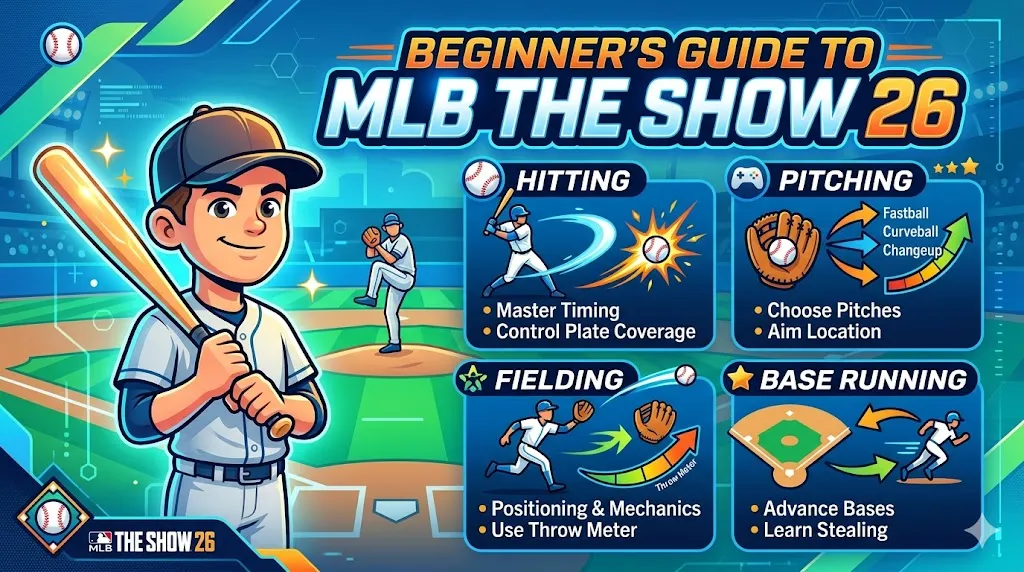
This section is anchored in the official MLB The Show 26 manual and official feature descriptions from San Diego Studio / Sony Interactive Entertainment.
At a practical level, hitting is “where + when + what swing”:
Where (plate coverage / zone choice). MLB The Show 26 offers multiple hitting interfaces designed for different levels of precision and mechanical load:
When (timing). Regardless of interface, your timing window depends on difficulty, pitch speed, and your own reaction consistency. That's why beginner success is often more about disciplined pitch selection (count leverage) than fancy swings.
What swing (normal/contact/power/bunt). The manual distinguishes swing types within each interface, giving you multiple swing intents. For beginners: use normal as default, reserve contact for two-strike protection situations, and treat power as situational until your timing is stable (power swings amplify timing punishment).
Beginner recommendation (batting). Start with Big Zone to build pitch recognition and timing without PCI overload; transition to Zone once you can routinely lay off pitches outside your chosen lanes. This is consistent with the game's own framing of Big Zone (intermediate) and Zone (advanced).
Pitching is “what pitch + where + how well you execute,” plus stamina/effort management:
Pitch selection and location. Every pitching interface begins with choosing pitch type and aiming location.
Execution by interface. MLB The Show 26 supports multiple pitching interfaces:
Bear Down (new in 26). Bear Down is a new clutch/effort mechanic intended for high-leverage moments: it lets your pitcher “dial up maximum effort,” but excessive use will wear the pitcher out quickly.
Beginner recommendation (pitching).
If you're brand new: start with Classic or Meter until you can reliably locate to quadrants without hanging pitches down the middle; then move to Pulse; then learn Pinpoint once you can mentally sequence pitches (fastball up, offspeed down, expand off-plate in two-strike counts). This progression matches the interfaces' implied complexity and community/analyst consensus that Pinpoint offers strong control but needs reps.
Fielding outcomes in The Show are a mix of reaction, route, input timing, and arm attributes. MLB The Show 26 also adds more granular defensive attributes (reaction in multiple directions) and catcher-specific attributes like pop time, reinforcing that defense is not “one rating fits all.”
For throwing interfaces, the official manual describes:
Beginner recommendation (fielding/throwing). Use Button Accuracy. It teaches you timing without forcing you to learn stick throws while also managing routes and jumps.
The baserunning system is best treated as “select runner → commit or stop → slide correctly”:
Beginner recommendation (baserunning). Choose Buttons if you panic-select the wrong runner, otherwise Analog if you want finer control once comfortable. Regardless, adopt one rule: do not spam advance—use “freeze runner” and make one runner decision at a time until your read speed improves. This aligns with the manual's emphasis on explicit targeting/control and reduces outs on the bases.
The table below synthesizes the manual's definitions (official), plus widely used beginner defaults from community settings guides (non-official but recent).
| Area | Scheme / Interface | Mechanical load | Skill ceiling | Best for beginners when… | Key tradeoff |
|---|---|---|---|---|---|
| Hitting | Big Zone | Medium | Medium | You need timing + pitch recognition first | No Perfect/Perfect potential by design |
| Hitting | Directional | Low | Low–Medium | You want “timing first” and less stick movement | Less precision/control than Zone |
| Hitting | Zone | High | High | You're ready to place PCI and hunt locations | Steeper learning curve |
| Hitting | Fixed Zone | High | High | You want Zone control without snap-back | Can reinforce “parking” PCI habits |
| Pitching | Classic | Low | Medium | You're learning sequencing and location | Less expressive control than Pinpoint |
| Pitching | Meter | Medium | Medium–High | You prefer timing meters | Misses are punished as difficulty rises |
| Pitching | Pulse | Medium | High | You can time the pulse consistently | Can feel inconsistent under pressure |
| Pitching | Pinpoint | High | High | You're ready for reps and maximum control | Requires practice; timing sensitive |
| Throwing | Button Accuracy | Medium | High | You want consistent throws with learnable timing | Mistimes cause errors; needs focus |
| Throwing | Buttons | Low | Medium | You want minimal throw mechanics | Less consistent in high-leverage throws |
| Baserunning | Buttons | Medium | High | You mis-select runners on Analog | Slightly slower decision flow |
| Baserunning | Analog | Medium–High | High | You're comfortable selecting individual runners | Higher mis-input risk early |
MLB The Show 26 exposes difficulty separately across hitting, pitching, and fielding, and also offers a Dynamic setting that adjusts to performance. Analytically, you want a difficulty that yields (a) enough strikes to learn, (b) enough punishment to enforce discipline, and (c) enough contact to keep feedback loops frequent.
Beginner baseline. Most new players should begin around Rookie/Veteran, move up when they can reliably take pitches and avoid chase swings, and use Dynamic if they want the game to self-tune during the learning phase.
This table summarizes the practical effects described in recent difficulty breakdowns (non-official) while remaining consistent with how The Show's core difficulty levers (PCI size, pitch speed, error forgiveness) are commonly discussed.
| Difficulty | Primary use case | What typically changes (player-facing) | When to move up |
|---|---|---|---|
| Beginner | First-time players | Very forgiving hitting (large PCI), slower pace | When you stop swinging at everything |
| Amateur | Early learners | Forgives timing mistakes | When you can track fastballs without panic swings |
| Rookie | Casual + early grinding | Forgiving timing; easier execution | When you can win without relying on “meatballs” |
| Veteran | Balanced baseline | “Feels fair” for many: challenge without extreme punishment | When you're ready to read pitches, not guess |
| All-Star | Competitive stepping stone | Forces better pitch recognition; mistakes punished | When you can hit fastballs on time consistently |
| Hall of Fame | High-skill play | Punishes slow PCI drags; tighter windows | When you can play patient two-strike ABs |
| Legend | Elite | Demands precision/timing; minimal forgiveness | When All-Star/HOF stops challenging you |
| G.O.A.T. | Extreme | “Pro-speed” feel; maximum punishment | Niche—only after Legend feels comfortable |
| Dynamic | Adaptive learning | Adjusts difficulty as you perform | Use when you want automatic calibration |
Camera choice is not cosmetic; it changes reaction time and how well you perceive break/velocity. The most common competitive advice is to use strike-zone style hitting cameras to reduce perceptual load and improve pitch recognition; recent MLB The Show 26 settings guides emphasize this as a “first menu change” because it impacts pitch-reading immediately.
Beginner camera defaults (practical).
PCI and PCI sensitivity (hitting). MLB The Show 26 introduces a PCI sensitivity slider, which controls how quickly the PCI moves with the analog stick. High sensitivity helps snap to inside heat; low sensitivity reduces overshooting. The key for beginners is stability: change it in small increments and test in practice against high-velocity fastballs.
Pitch history and scouting. MLB The Show 26's expanded pitch history tools are meant to make tendencies visible (count splits, handedness, and more), and Game Update 2 increased pitch history tracking up to 25 pitches (notable for longer games and online reads). Treat pitch history as “free information”: if you aren't checking it at least once per game, you're missing a major learning accelerator.
Throw meters and baserunning UI. In the field, Button Accuracy is explicitly tied to a timing region that scales by throw distance and arm accuracy—so your UI is literally telling you how risky the throw is. On the bases, learn the “freeze runner” function early; it exists because over-advancing is one of the fastest ways to give away outs.
The flagship mode design in MLB The Show 26 is publicly framed as “more control, more progression hooks, and better onboarding,” particularly in RTTS, Franchise, and Diamond Dynasty.
RTTS is the most beginner-friendly environment because you can focus on one player and repeat the same core situations until your timing stabilizes.
What's new and why it matters for beginners. RTTS expands the amateur experience (more schools, officially licensed college tournament structure) and adds more frequent goals/achievements throughout the journey—meaning you get clearer short-term objectives rather than feeling lost.
Beginner strategy (RTTS).
Franchise is a management sandbox with optional on-field play; it becomes beginner-friendly when you constrain complexity.
What's new in 26. Franchise emphasizes more realistic trading (including a Trade Hub, improved logic, and more nuanced valuations), plus the ability to choose “full control” versus “streamlined” experiences and jump into games via Custom Game Entry.
Beginner strategy (Franchise).
Diamond Dynasty is the “ultimate fantasy baseball” mode: you collect player cards (from packs, programs, rewards), build a squad, and play both offline and online sub-modes.
Access and platform requirements. Diamond Dynasty requires an internet connection; many online sub-modes also require platform-specific online subscriptions (PlayStation Plus, Xbox Game Pass Core/Ultimate, Nintendo Switch Online).
Beginner strategy (Diamond Dynasty, no-money-spent friendly).
Online play in The Show is not just “harder CPU”—it's different pacing and psychological pressure. Beginner success online is mostly about removing unforced errors: chases, bad throws, and reckless baserunning.
Play Now online modes. Online Rated is the simplest on-ramp: “competitive online exhibition match.” Custom Leagues and Online Co-Op provide structured or cooperative environments to play with friends.
Diamond Dynasty online sub-modes. The manual's breakdown highlights:
Beginner strategy (online, practical).
This table is grounded in the official manual's mode descriptions plus the PlayStation feature overview.
| Mode | Primary objective | Beginner-friendly win condition | What you “take home” |
|---|---|---|---|
| Road to the Show | Develop one ballplayer career from amateur to MLB | Complete goals; stabilize batting/pitching timing | Player progression + structured learning loops |
| Franchise | Run a club (roster, budget, trades, scouting) across seasons | Delegate tasks; play key moments | Team-building mastery; long-horizon development |
| Diamond Dynasty (offline) | Build roster through play; complete programs | Conquest/Moments/Showdown for rewards | Packs, players, XP path rewards, Stubs |
| Diamond Dynasty (online) | Compete for seasonal/event rewards | Play Events/Co-Op to learn online pacing | Ranked/event rewards + faster progression multipliers |
| Online Rated | “Play Now” competitive exhibition | Learn human pitching patterns | Skill development; low setup overhead |
| Custom Leagues / Online Co-Op | Play with friends under customized rules | Lower-stress repetition with social feedback | Social learning + consistent reps |
Diamond Dynasty's progression is intentionally multi-layered: session-level rewards (Stubs, XP), card-level progression (PXP/Parallels), and collection-level goals (locking sets for major rewards).
XP Reward Path. The official manual describes XP as tied to an XP Reward Path: you earn XP “in any mode,” hit thresholds, and earn better rewards over time.
Parallel XP 2.0 and customization. MLB The Show 26 retools Parallel XP (“Parallel XP 2.0”), describing it as more than a border—more use of a card enables more tailoring of stats/presentation to match play style. The PlayStation feature page also highlights upgraded PXP and “Parallel Mods” for customization.
Practical implication for beginners: you should pick a small “core” lineup early and actually play them. Spreading reps across too many cards slows Parallel progression and makes your feedback loop noisier (you never learn how a hitter “really feels”). This principle is directly supported by the manual's “the more you use a card” framing and ShowZone's focus on early program cards and missions.
Stubs (in-game currency). The manual defines Stubs as the in-game currency used to purchase cards in packs or in the Community Marketplace.
Microtransactions (official). Stubs are also sold as platform add-ons (virtual currency). The official PlayStation Stubs page explicitly frames Stubs as in-game currency for in-game buys and notes a key platform difference: Stubs purchased on one game platform are not transferable to another. Xbox also sells Stubs as add-ons.
Community Marketplace mechanics. The manual describes the Community Marketplace as an official “digital bazaar” with buy/sell orders and “Buy/Sell Now.”
Recent 2026 marketplace update (important). An official SDS support article (March 5, 2026) states that after roster attribute updates, existing marketplace buy/sell orders will be cancelled/refunded if they fall outside Stubs limits set by a player item's updated overall rating (OVR), and that this should be expected going forward in MLB The Show 26. This matters for beginners because it reduces “set-and-forget” order assumptions around roster updates.
Do not treat packs as your main upgrading plan. Packs are a variable outcome mechanism; programs and repeatable modes provide deterministic progress. This is consistent with the manual's framing of tutorials → rewards and ShowZone's onboarding path (Starter Program, early Programs, WBC content).
Use the marketplace like a tool, not a casino. Start with two actions:
Flipping vs manipulation. SDS support explicitly states that flipping cards in the Community Marketplace will not put your account at risk for suspension, while cautioning about the difference between flipping and manipulation. For a beginner, that means basic buy-low/sell-high activity is generally treated as legitimate—but avoid anything that resembles artificially manipulating transactions.
If you spend, treat it as “time substitution,” not “skill substitution.” Even high-end cards do not replace pitch recognition and timing—this is why the most sustainable beginner plan is still practice (and stable settings). The PXP/parallel systems also reward playing, not just purchasing.
Avoid third-party currency trades/sales. Two independent policy anchors support this:
This section translates official practice tools and 2026 mechanics (Big Zone, Bear Down, pitch history changes, PCI sensitivity) into a training routine that produces measurable improvement.
Over-swinging early in counts. On higher difficulties, MLB The Show 26 explicitly “forces you to read pitches,” meaning impatience becomes the main reason beginners feel stuck. The fix is not “better reflexes” first; it is better swing selection first.
Treating Bear Down as “always on.” Bear Down is designed as a clutch tool with a fatigue tradeoff; spamming it undermines your pitcher's stamina and makes late innings harder.
Panic baserunning. Most beginner outs on the bases come from advancing multiple runners without a clear read. Use the manual's explicit runner control tools (freeze runner; send-to-base commands) to slow the decision loop until you can read ball depth off the bat.
Changing settings constantly. MLB The Show 26 adds more customization (PCI sensitivity, new hitting styles, deeper pitch history). The danger is turning every slump into a settings change. Use a controlled test plan: change one variable, run a practice drill, then decide.
Use Custom Practice deliberately. The manual explicitly states Custom Practice lets you set pitch percentages and simulate uncertainty—meaning you can build training that mimics real sequences rather than mindless batting practice.
A beginner routine that maps to real improvement:
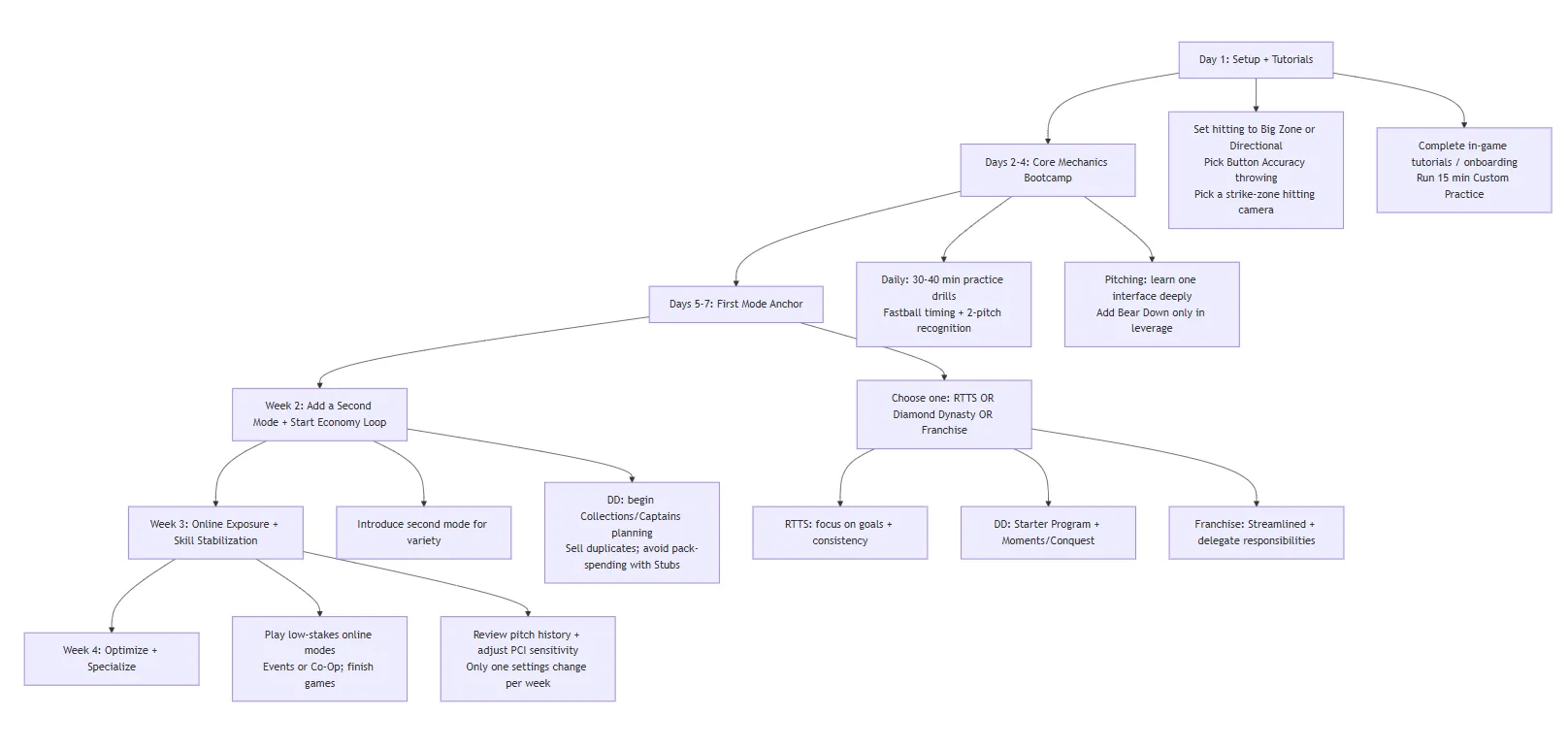
This plan is based on official learning tools (Custom Practice, Options Explorer), official mode structures (RTTS goals; DD onboarding), and current 2026 systems (Big Zone, Bear Down, pitch history expansion, PCI sensitivity).
For a timing-based sports game, performance tuning is mostly about reducing input latency and stabilizing frame pacing.
PlayStation 5 video output settings. PlayStation Support documents key toggles directly relevant to competitive timing:
TV “Game Mode.” Nintendo's support guidance for docked play notes that TVs often have a “game mode” that increases internal processing speed and can resolve sync issues—conceptually the same “reduce processing delay” goal as ALLM.
Controller and sensitivity. If your PCI is “too twitchy” or you overshoot pitches, tune PCI sensitivity first (small increments), then train in practice mode against high velocity to see whether your contact quality stabilizes.
Authored by elite gamers and industry insiders, the U4N Editorial Team delivers authoritative game updates, patch notes breakdowns, and expert strategies for trending titles including World of Warcraft, Path of Exile 2, MapleStory, Aion 2, and Arc Raiders.
From deep-dive guides to the latest meta shifts, our in-house veterans test every tactic firsthand to keep you ahead of the game.