購物車空
繼續購物In MLB The Show 26, mastering the Plate Coverage Indicator (PCI) is key to improving your hitting. For competitive players, the goal is to create a clean, minimalist look that allows you to focus on the ball without distractions. While everyone's preferences differ, there's a general "meta" used by top-tier players that emphasizes specific visual settings and configurations. Here's everything you need to know to get the best PCI setup for your game.
For an edge in your gameplay, high-level players recommend these configurations:
| Setting | Recommended Value | Why It Helps |
|---|---|---|
| PCI Style | Bat or Diamond | Provides a clean center point without distracting clutter. |
| PCI Inner | None or Wedge | "None" minimizes distractions, while "Wedge" helps visualize the sweet spot. |
| PCI Outer | None | Most competitive players disable this for a cleaner screen. |
| PCI Color | Yellow or Cyan | These colors stand out well against most stadium backgrounds. |
| PCI Opacity | 50% – 70% | Visible enough to track, but transparent enough to still see the ball. |
| PCI Fadeout | None | Keeps the PCI visible throughout the pitch, aiding consistency. |
Here are the key PCI settings that experienced players use to get the best results in MLB The Show 26:
| Setting | Recommended Value | Why It Helps |
|---|---|---|
| Hitting Interface | Zone | Full control over PCI movement and angle, essential for hitting accuracy. |
| PCI Sensitivity | ~60–75% (or up to max) | Provides a good balance between quick reactions and smooth movement. |
| PCI Style | Bat | Minimal, clean visual that reduces distractions. |
| PCI Center / Marker | Bat or Diamond | "Bat" is recommended for clarity; "Diamond" adds extra precision. |
| PCI Inner / Outer | None | Keeps the screen clear and simple, minimizing clutter. |
| PCI Color | Bright (e.g., Spring Green / Sky Blue) | Easier to track the pitch with high contrast against most backgrounds. |
| PCI Opacity | ~60–70% | Gives you enough visibility of the PCI without overpowering the screen. |
| PCI Fadeout | Off | Keeps the PCI visible for consistency during the pitch. |
| PCI Anchor | On or Off (based on preference) | On resets the PCI to the center each pitch; Off gives more freedom. |
| Guess Pitch | Off | Encourages relying on skill instead of guesswork. |
| Swing Input | Buttons | Buttons are generally faster and more reliable than analog input. |
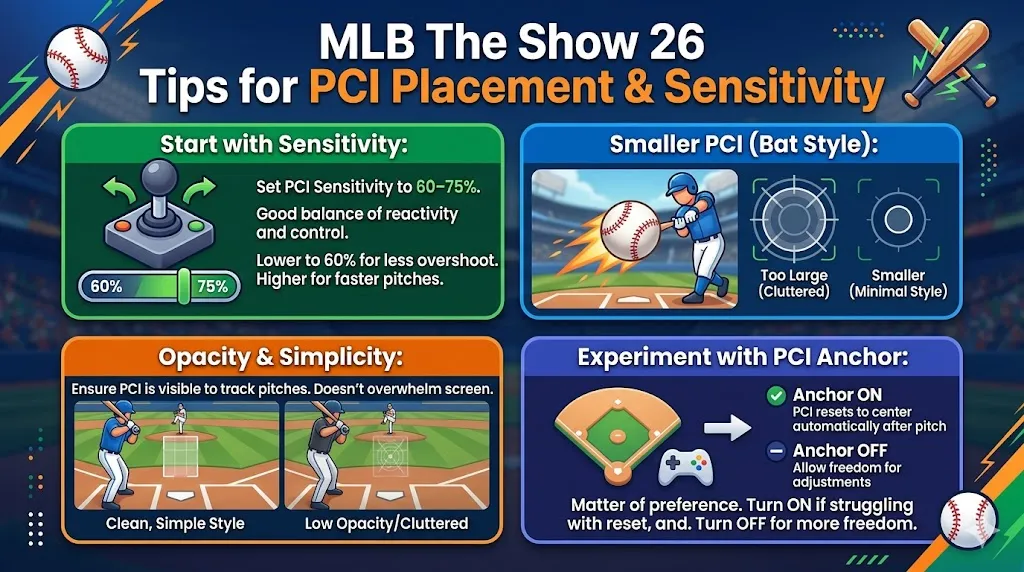
Set your PCI Sensitivity to 60–75%. This gives you a good balance between reactivity and control. If you tend to overshoot, dialing it back to 60% is a great place to start. As you get more comfortable, you can push it higher, especially for faster pitches.
A smaller PCI helps you focus on the ball's release point instead of the marker. This minimal style is recommended for players who want to stay focused and avoid clutter.
Opt for high opacity settings around 60-70%. This ensures the PCI is visible enough to track pitches but doesn't overwhelm your screen. Pair this with a clean, simple style for the best results.
The PCI Anchor setting is a matter of preference. If you struggle with resetting after each pitch, turn it on to reset to the center automatically. Alternatively, turn it off to allow more freedom for pitch adjustments.
Mastering your PCI (Plate Coverage Indicator) settings in MLB The Show 26 can make a world of difference in your hitting performance. With the right visual configurations, you’ll be able to track pitches better and make more precise contact. As you adjust to your playstyle, it's essential to stay focused on your gameplay and reduce distractions. Alongside tweaking your PCI, having a reliable source for in-game items like MLB 26 Stubs is crucial for enhancing your gaming experience. When you’re looking for a reliable MLB 26 Stubs seller, make sure to check out U4N, a trusted platform known for its secure transactions and competitive prices. U4N helps players get the best value MLB 26 Stubs, letting you focus on the game without worrying about the grind. Whether you're building your Diamond Dynasty or upgrading your team, U4N is your go-to for a safe and affordable experience.
While not directly related to PCI, these settings can help you improve pitch tracking and focus:
| Setting | Recommended Value | Why It Helps |
|---|---|---|
| Hitting Camera | Strike Zone / Strike Zone High | Offers the best view of the pitcher's release point. |
| Hitting Depth of Field | On | Focuses on the ball's flight path, reducing visual distractions. |
If you're looking for a simple starting setup, here's a quick and easy profile to test in Practice Mode. Adjust it as you become more comfortable with tracking pitches:
Zone Hitting
PCI Sensitivity: 70%
PCI Style: Bat
PCI Color: Spring Green
Opacity: 65%
PCI Anchor: On
Guess Pitch: Off
Swing Input: Buttons
This setup is designed to give you control over your PCI without overwhelming you with unnecessary clutter. Once you get a feel for the sensitivity and style, you can make small adjustments based on your preferences.
MLB The Show 26 introduces a dedicated PCI Sensitivity Slider that lets you control how fast the PCI moves.
| Competitive Speed | Recommended Setting | Why It Helps |
|---|---|---|
| Maximum Speed | 100% | Quick reaction to high-velocity pitches on the corners. |
| Precision Control | 60%–75% | Gives smoother, more deliberate tracking. |
Pair your PCI setup with these core gameplay settings for optimal results:
| Setting | Recommended Value | Why It Helps |
|---|---|---|
| Hitting Interface | Zone | Complete control over PCI, crucial for precise hitting. |
| Hitting Camera | Strike Zone or Strike Zone High | Offers the best view of the ball's trajectory. |
| PCI Anchor | Off (Free) | Allows more flexible placement, giving you better coverage. |
U4N編輯團隊由一群熱愛遊戲的分析師和技術專家組成。我們不僅是一個可靠的遊戲資產市場——我們的核心目標是通過專業內容幫助玩家。我們的團隊為一些大熱門遊戲製作詳細的攻略、經濟策略和技術問題解決方案,包括《MLB The Show 26》、《Aion 2》、《Forza Horizon 6》、《Arc Raiders》和《Path of Exile》等。
無論是掌握遊戲市場的買賣技巧,還是幫助你打造最強的遊戲角色或策略,我們發布的每一份內容都經過我們團隊的實際測試。在 U4N,我們不僅跟隨遊戲的趨勢,我們還幫助你領先一步