購物車空
繼續購物Pinpoint Pitching is the most precise pitching interface in MLB The Show 26. Unlike standard meters or analog pitching, it relies on three coordinated steps: tracing the pitch path, timing your release, and aiming the ball toward your intended target. Mastering this system can help you dominate both CPU and online hitters by minimizing mistakes and placing pitches exactly where you want them.
After choosing your pitch, a gesture diagram appears on the screen. Using the right analog stick, you must trace the diagram accurately.
When your trace ends, two circles appear at the bottom of the diagram. These circles begin to close toward each other, signaling the release timing.
The final flick must be aimed precisely at your target in the strike zone.
If you're looking to take your MLB The Show 26 experience to the next level, practicing Pinpoint Pitching is essential, but having the right resources can make a huge difference—players who want to build their rosters faster and focus on gameplay can visit U4N to buy Instant delivery MLB 26 Stubs, giving them the flexibility to unlock top cards and improve their team without the grind.
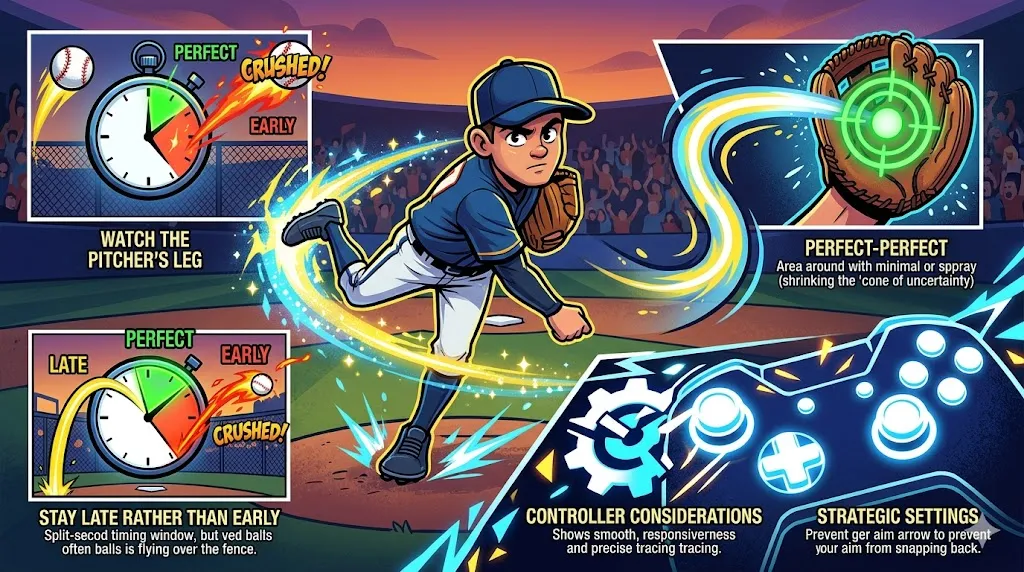
Instead of only focusing on the meter, time your release with the pitcher's leg kick or arm motion. Many players find this visual cue more reliable than watching the UI alone.
Landing all three components perfectly results in a “perfect” release, which dramatically shrinks the pitch's cone of uncertainty. The ball almost always lands exactly where you aim.
If you're slightly off on timing, it's better to be a fraction late than early. Early releases often make breaking balls hang, giving hitters a better chance to crush them.
Some standard Xbox controllers may have stick responsiveness issues, affecting pinpoint accuracy. Community feedback often recommends high-polling third-party controllers like the GameSir G7 SE for smoother tracing and faster reaction.
Enable the Fixed Pitch Location toggle in settings. This prevents your left stick aim from snapping back to center during the pinpoint motion, letting you maintain steady precision without constantly re-adjusting.
Mastering Pinpoint Pitching in MLB The Show 26 is all about coordination, timing, and patience. With practice, you can consistently hit corners, freeze hitters, and rack up strikeouts while controlling the pace of every at-bat.
U4N編輯團隊由一群熱愛遊戲的分析師和技術專家組成。我們不僅是一個可靠的遊戲資產市場——我們的核心目標是通過專業內容幫助玩家。我們的團隊為一些大熱門遊戲製作詳細的攻略、經濟策略和技術問題解決方案,包括《MLB The Show 26》、《Aion 2》、《Forza Horizon 6》、《Arc Raiders》和《Path of Exile》等。
無論是掌握遊戲市場的買賣技巧,還是幫助你打造最強的遊戲角色或策略,我們發布的每一份內容都經過我們團隊的實際測試。在 U4N,我們不僅跟隨遊戲的趨勢,我們還幫助你領先一步