購物車空
繼續購物The Horizon EventLab toolkit remains one of the most powerful features in Forza Horizon 6, giving players the freedom to build, share, and experience highly customized game modes. Whether you want to challenge yourself on intricate technical race tracks, explore bespoke community-created environments, or utilize optimized resource-farming maps to maximize your in-game progression, community blueprints offer endless variety. Accessing these custom setups requires utilizing a unique 9-digit identification string known as a Share Code.
To load any custom community blueprint, race, or farming map using its assigned 9-digit code, step out of your garage into the open world and execute the following sequence:
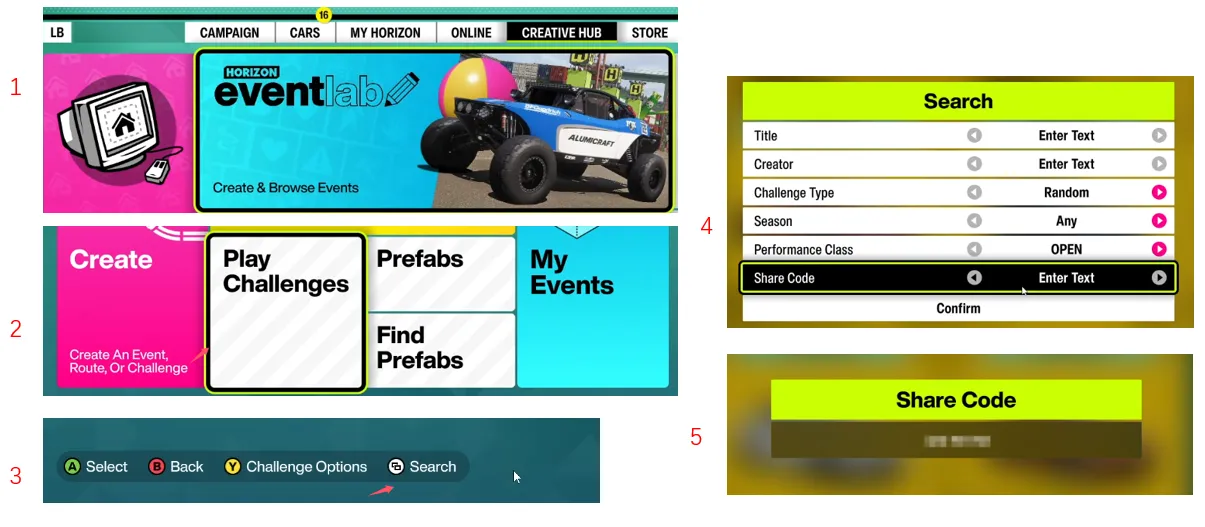
Pro-Tip: Instead of manual entry every time you want to play, look at the event details card once your searched map appears and press the Y button on your controller (or the corresponding key mapping on PC) to "Favorite" the track. This action saves the blueprint permanently to your local favorites folder, bypassing the need to look up or input the 9-digit code again.
If you have created a custom track configuration using the EventLab toolset and wish to distribute the file to friends or the broader Forza community, you will need to retrieve its unique generated Share Code. You can find this string within your personal creator archive via these steps:

Once your custom track is ready and your unique 9-digit code is live, sharing it with the community is the perfect way to show off your design skills—but having the right vehicles to test those intense circuits makes all the difference. If you want to tackle these community builds with the absolute best performance possible without spending hours grinding, you can visit U4N to buy forza 6 cars online quickly and securely. Equipping your garage with top-tier hypercars or specialized rally builds ensures you can dominate any custom layout, track your skill progression seamlessly, and experience everything the EventLab has to offer at full speed.
The blueprints detailed below represent highly rated and active community builds within the game, split into specific categories depending on your short-term gameplay goals.
These specialized creations focus on maximizing your layout efficiency, helping you accumulate Credits (CR), Experience Points (XP), and Super Wheelspins in the shortest time frame possible.
| Track Purpose | EventLab Share Code | Best Car / Method |
|---|---|---|
| Ultra Fast Colossus (CR & XP) | 401 393 298 | High-tier hypercars or S2-class vehicles. Highly effective for long-distance driving assist testing. |
| AFK Straight Line Mastery | 381 054 444 | Subaru Impreza 22B. Maintain full throttle down a completely clear stretch to stack clean skill chains. |
| Active Quick Farming | 861 224 889 | Extreme Track Toys or high-handling platforms designed to quickly burn through specific car mastery perks. |
| One Map Goliath | 147 520 403 | Toyota Tacoma Forza Edition. Combine structural track layouts with maximum driving assists for steady gains. |
| 999k XP Blueprint | 957 924 600 | Subaru Impreza 22B. Leverages the car's built-in Multi-Maxer 9x perk node to accelerate level progression. |
For drivers focused purely on design quality, alternative racing lines, and unique environments, these community-designed circuits offer excellent terrain variety and handling challenges:
If you ever need a rapid reminder of the core workflow while mid-game, keep this four-step loop in mind:
U4N編輯團隊由一群熱愛遊戲的分析師和技術專家組成。我們不僅是一個可靠的遊戲資產市場——我們的核心目標是通過專業內容幫助玩家。我們的團隊為一些大熱門遊戲製作詳細的攻略、經濟策略和技術問題解決方案,包括《MLB The Show 26》、《Aion 2》、《Forza Horizon 6》、《Arc Raiders》和《Path of Exile》等。
無論是掌握遊戲市場的買賣技巧,還是幫助你打造最強的遊戲角色或策略,我們發布的每一份內容都經過我們團隊的實際測試。在 U4N,我們不僅跟隨遊戲的趨勢,我們還幫助你領先一步