購物車空
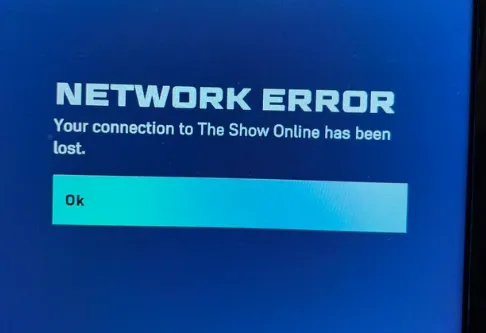
繼續購物Here's a simpler, more natural version of the solution for the MLB The Show 26 network error on PS5:
Unplug both for 60 seconds and then plug them back in to help reset the connection.
Switching from Wi-Fi to an Ethernet cable can improve stability and reduce errors.
Navigate to Settings > Applications > Manage Installed Applications > MLB The Show 26 and clear the cache.
Go to your profile icon at the top menu, select Account Offline, then try reconnecting.
Ensure that both MLB The Show 26 and your PS5 system software are up to date.
If you're facing network errors while playing MLB The Show 26 on PS5, try these simple fixes to get back on track. Start by restarting your router and PS5, and switch to a wired connection for better stability. Clearing the game cache and setting your account offline may also help resolve the issue. Don’t forget to check for any available updates for both the game and your PS5 system software. And if you're looking to enhance your experience, consider buying MLB 26 Stubs PS5 through reliable platforms like U4N for a smoother in-game progression.
Instead of restarting the game, go to My Profile, select Account Offline, and return to the main menu. Press any button to try logging in again.
Stay at the main menu and let the game go into demo mode, then quickly exit. This can sometimes bypass the error.
Turn off Crossplay in your profile settings, wait a bit, then turn it back on to reset the connection.
Go to Network Settings and set your DNS to 8.8.8.8 (primary) and 8.8.4.4 (secondary) for a more stable connection.
In Screen and Video settings, turn off 120 Hz Output and set the game to 60 FPS to fix some connectivity issues.
U4N編輯團隊由一群熱愛遊戲的分析師和技術專家組成。我們不僅是一個可靠的遊戲資產市場——我們的核心目標是通過專業內容幫助玩家。我們的團隊為一些大熱門遊戲製作詳細的攻略、經濟策略和技術問題解決方案,包括《MLB The Show 26》、《Aion 2》、《Forza Horizon 6》、《Arc Raiders》和《Path of Exile》等。
無論是掌握遊戲市場的買賣技巧,還是幫助你打造最強的遊戲角色或策略,我們發布的每一份內容都經過我們團隊的實際測試。在 U4N,我們不僅跟隨遊戲的趨勢,我們還幫助你領先一步