購物車空
繼續購物If you're diving into MLB The Show 26), switching your favorite team is a subtle but impactful customization. It changes your main menu aesthetics, default team selections, and even audio cues.
From the main menu, locate the Settings option in the upper corner of the screen. This is where all user-specific preferences live.
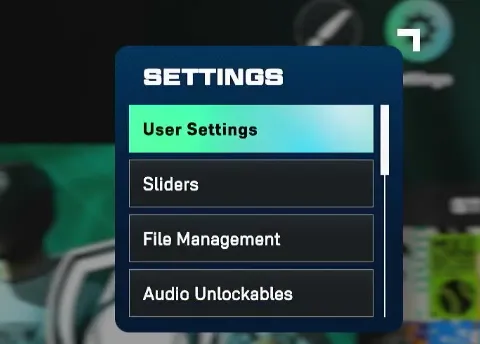
Navigate to User Settings to manage your profile and preferences.
On PlayStation, press Square; on Xbox, press X to enter the Settings Preset menu. This menu houses a variety of customization options, including your favorite team.
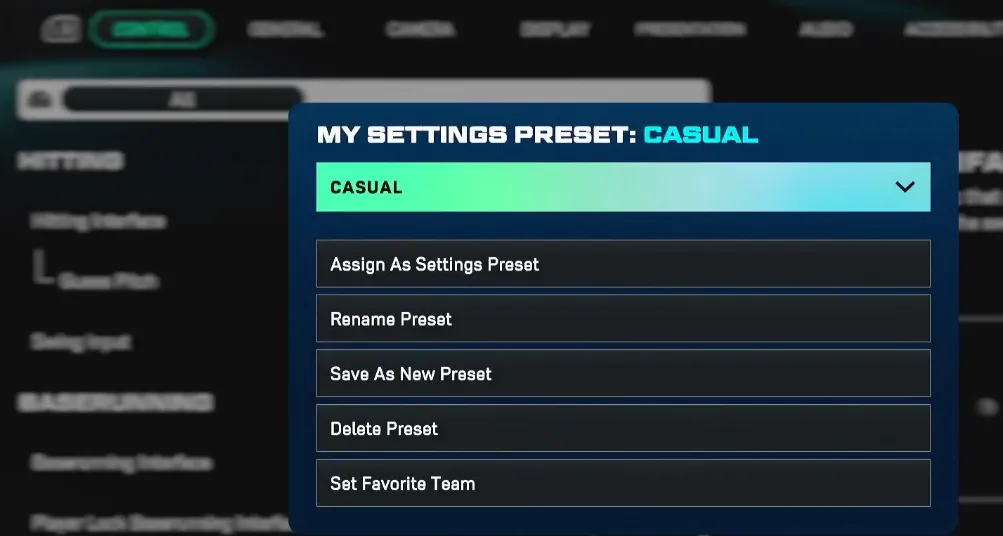
Scroll all the way to the bottom of the Settings Preset menu. You'll find the Set Favorite Team option tucked there.
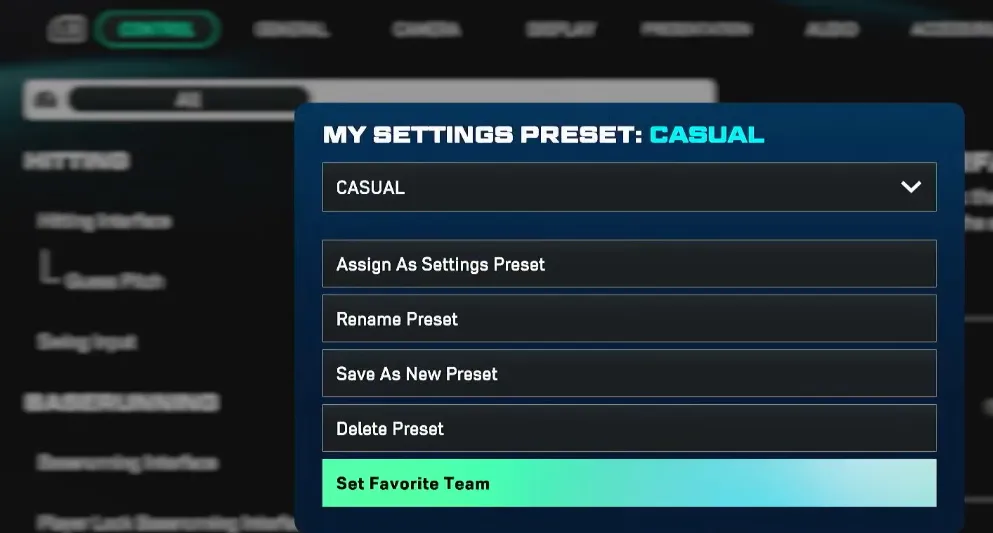
Pick your new favorite team from the list. Confirm the selection, and the game will immediately apply changes across menus and default selections.
For MLB The Show 26 players looking to get the most out of their experience, changing your favorite team is just the beginning—pairing it with quick access to in-game resources can really enhance gameplay. Platforms like U4N make it easy to secure cheap MLB The Show 26 Stubs, letting you unlock packs, customize your roster, and fully enjoy the new team you've chosen without breaking the bank.
In MLB The Show 26, the favorite team toggle is hidden deeper than in previous editions. Earlier games placed it under a visible "three dots" (...) menu, but the 26th edition moved it to the Settings Preset submenu. This small change caused confusion for many players who expected a more intuitive path. Once you locate it, however, changing your team updates:
Changing your favorite team is quick once you know where to look. If you want to explore further, you can also change or rebrand your team in Franchise Mode, or customize your logos and branding in Diamond Dynasty, giving your profile a fully personalized feel.
U4N編輯團隊由一群熱愛遊戲的分析師和技術專家組成。我們不僅是一個可靠的遊戲資產市場——我們的核心目標是通過專業內容幫助玩家。我們的團隊為一些大熱門遊戲製作詳細的攻略、經濟策略和技術問題解決方案,包括《MLB The Show 26》、《Aion 2》、《Forza Horizon 6》、《Arc Raiders》和《Path of Exile》等。
無論是掌握遊戲市場的買賣技巧,還是幫助你打造最強的遊戲角色或策略,我們發布的每一份內容都經過我們團隊的實際測試。在 U4N,我們不僅跟隨遊戲的趨勢,我們還幫助你領先一步