MLB The Show 26 introduces a new feature called the Automated Ball-Strike (ABS) Challenge System. This feature mirrors the system Major League Baseball is using in the 2026 season. It gives players the ability to contest umpire calls for balls and strikes, making the game even more realistic and interactive.
The ABS Challenge System Explained
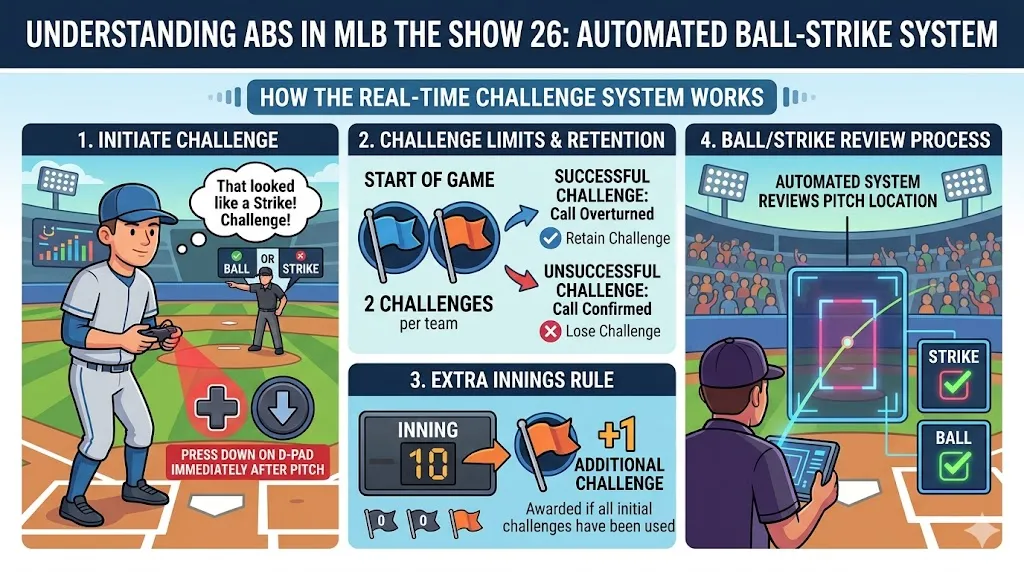
In MLB The Show 26, the ABS system lets players challenge home plate umpire calls on balls and strikes. If you think an umpire's decision is wrong, you can call for a review.
1. Challenge Process
- Challenge Initiation: After each pitch, players can challenge the umpire's call by pressing down on the D-pad.
- Challenge Limit: Each team starts with two challenges per game. If you use both and want to challenge again, you'll need to rely on a potential extra inning challenge (explained below).
- Success or Failure: If your challenge is successful, the umpire's call will be overturned, and you'll keep your challenge. But if the umpire's call is confirmed, your team will lose that challenge for the rest of the game.
2. Extra Innings Rule
In case the game goes into extra innings, teams are given one more challenge, even if they've used up their initial two. This extra challenge is a helpful way to keep things fair in high-stress moments during overtime.
Availability and Restrictions
The ABS Challenge System isn't available everywhere in MLB The Show 26. Here's what you need to know about where and how you can use it:
1. Offline Modes Only
- The system is exclusive to offline modes like Road to the Show (RTTS) and Franchise mode. This means you can enjoy the challenge system while playing single-player experiences, but not during online matches.
2. No ABS in Online Play or Diamond Dynasty
- For online play and Diamond Dynasty, umpire accuracy is set to "Perfect." This means the game ensures no missed calls or errors during these competitive modes. You won't be able to challenge ball and strike calls in these modes.
How to Toggle the Feature
If you prefer to play with or without the ABS system, you can easily turn it on or off. Here's how:
- Go to Settings: Open the game's settings menu.
- Navigate to General: Find the General section in the settings.
- Select Rules: Under the Rules section, look for the "ABS Challenge System."
- Toggle the Feature: You can enable or disable it from there, depending on your preference.
作者簡介
U4N編輯團隊由一群熱愛遊戲的分析師和技術專家組成。我們不僅是一個可靠的遊戲資產市場——我們的核心目標是通過專業內容幫助玩家。我們的團隊為一些大熱門遊戲製作詳細的攻略、經濟策略和技術問題解決方案,包括《MLB The Show 26》、《Aion 2》、《Forza Horizon 6》、《Arc Raiders》和《Path of Exile》等。
無論是掌握遊戲市場的買賣技巧,還是幫助你打造最強的遊戲角色或策略,我們發布的每一份內容都經過我們團隊的實際測試。在 U4N,我們不僅跟隨遊戲的趨勢,我們還幫助你領先一步