Cart Empty
Continue ShoppingIn MLB The Show 26, a new feature has been introduced that mirrors the real-life Automated Ball-Strike (ABS) Challenge System implemented in the MLB for the 2026 season. This system adds a layer of realism and strategy by allowing players to challenge the umpire's ball and strike calls during the game.
The ABS Challenge System lets players challenge the umpire's calls on balls and strikes. It's designed to help reduce incorrect calls and add more depth to the gameplay. Here's how it works and how you can make the most of it.
To challenge a ball or strike call, simply press the down button on your D-Pad immediately after the umpire makes the call. This must be done instantly, so be ready to act fast. Once activated, the game will assess whether the pitch passed through the strike zone.
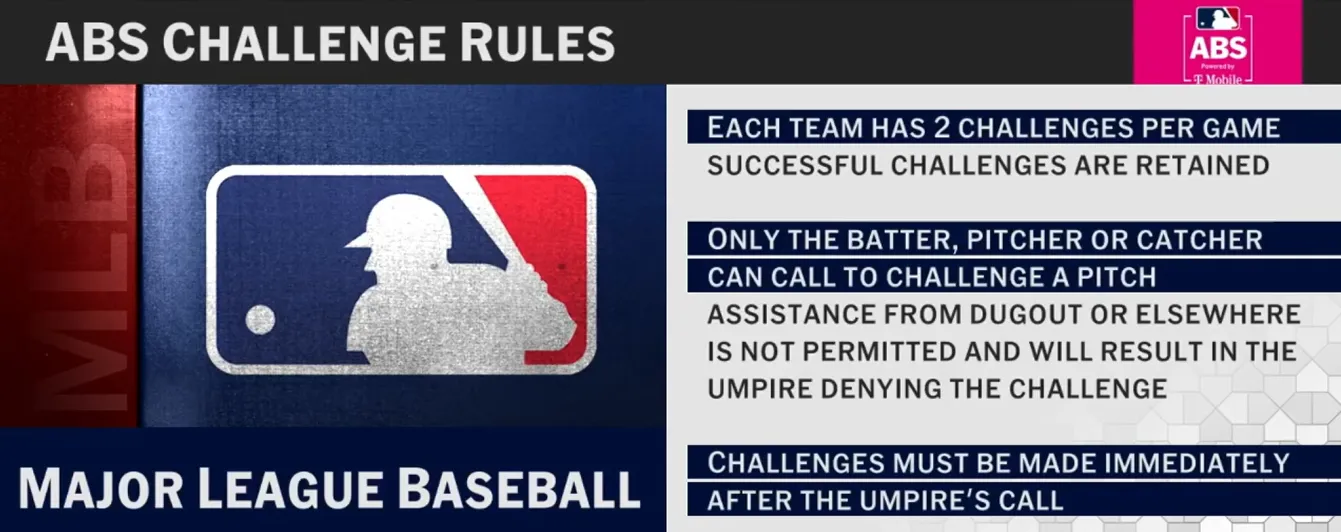
In MLB The Show 26, teams are limited to just two challenges per game. This means you need to use them wisely. You won't get unlimited chances, so pick your moments carefully. A failed challenge means you lose the opportunity to use that challenge for the rest of the game.
The ABS Challenge evaluates whether the ball passed through the strike zone based on its trajectory. When you challenge a call, the game will often display visual feedback on the screen, showing where the pitch actually crossed the plate in relation to the strike zone. This provides a more realistic and immersive experience as you get a clear view of why a call was either upheld or overturned.
While the ABS Challenge is available in most of the offline modes, it's mainly designed to enhance the realism of the game. You won't find it active in online gameplay, as using it could lead to lag or disconnection issues in competitive matches. So, you'll mainly be using this feature when playing solo or in modes like Franchise or RTTS.
Just like in real baseball, you need to challenge a call immediately. This can be done by the batter, pitcher, or catcher, but the challenge has to occur right after the call is made. There's no time to wait, so it's all about reacting quickly.
The ABS Challenge System in MLB The Show 26 adds a whole new layer of strategy to the game. Whether you're challenging an umpire's call during a high-pressure moment or using your challenges wisely in extra innings, understanding how to navigate the system can make a big difference in your gameplay. Just like in real MLB, being strategic with your challenges is key to making sure you have them available when it counts most. For players looking to maximize their experience in Diamond Dynasty, don’t forget to grab MLB 26 Stubs for sale at U4N. It's the best way to level up faster, acquire top-tier players, and skip the grind, so you can focus on mastering features like the ABS Challenge system without worrying about your stubs!
Here's the thing—this is an issue that most players won't notice unless they're paying close attention. Watch the replay of a pitch and tell me: Was it a ball, or was it a strike? For some of you, this might be tough because the game is moving fast, but the replay shows that the ball just barely clips the bottom of the strike zone.
But, when you're actually playing the game, that pitch looks nowhere near the strike zone. When the ball crosses the plate, it's practically outside the box. The problem? The game doesn't give you an accurate representation of the pitch in real-time. You're left trying to figure out where the pitch crossed, and the strike zone disappears, making it incredibly hard to judge what's really going on.
Now, this is where things get weird. In the replay, you'll see an animation sequence where the call gets overturned. But the real kicker? That ball didn't cross the zone the way the game's telling you. In fact, the whole animation feels like it's designed just to add drama, but the call is wrong.
When you go back and freeze-frame the shot, you can see the pitch location clearly. It doesn't even come close to where the ABS system claimed it crossed. It's a sequence of faked drama that's supposed to make the game seem realistic, but in reality, it's nothing but smoke and mirrors.
Here's where things get frustrating. While playing, the strike zone disappears right when you need it the most. When you're trying to visualize where the ball crossed the plate, you don't get any of the helpful lines or boundaries that would normally help you decide if it was a ball or a strike. It's not until after you review the pitch that you can see the strike zone and realize just how off the game was.
Now, think about it: How does this make sense? The ABS system is supposed to be more realistic, but the implementation feels like a bad joke. They sold us this feature as a way to improve the game's realism, but it's clearly far from accurate.
This is the big question: How did San Diego Studios miss this glaring issue? How did they release a game with this kind of glitch and think they could get away with it? The ABS system was supposed to add an extra layer of realism to the game, but in reality, it's just a broken feature that doesn't deliver.
They've marketed this feature as an improvement, but when you dig into it, you realize the system isn't working as promised. They've hyped this up, but when you actually play the game, you can see that it's far from perfect. And don't even get me started on the testing process—how did no one catch this before release?
Here's the problem: ABS challenges seem to be limited to offline modes only. Some players have been noticing that even though the game claims the system will automatically generate challenges online, they've yet to see one. In fact, some players have already encountered over 30 wrong calls without seeing a single challenge get triggered.
This lack of functionality in online games is a major letdown. Why not just add a challenge option under the manager section of the pause menu, like in real-life baseball? It would be an easy way to let players challenge calls in both offline and online modes, creating a more authentic experience. But instead, players are stuck with wrong calls and no way to fix them online.
A lot of players are frustrated because in online head-to-head games, the calls are set to "perfect", meaning they don't see challenges being triggered even when pitches in the zone are called balls. The system that determines a strike zone in-game doesn't always match up with the actual rulebook definition used by the ABS system.
In the game, it seems that for a pitch to be called a strike, most of the ball has to be within the strike zone. But in real MLB ABS, even a sliver of the ball touching the zone should be considered a strike. The inconsistency between the two systems leads to confusion and frustration.
The good news is that ABS challenges work in offline modes like mini-seasons or while playing against the CPU. Players can press down on the D-Pad after a pitch to initiate a challenge. However, this feature isn't available in Diamond Dynasty or online head-to-head (H2H) modes, which is where most of the complaints are coming from.
Some players have found success using the system in RTTS (Road to the Show) as well, but again, this functionality is limited to offline play.
It's clear that the ABS Challenge System needs some improvements, especially for online play. It's hard to enjoy the challenge feature when it's so inconsistent and unavailable in the most popular modes. The developers need to address these issues and make the ABS Challenge system work for everyone, not just in offline games.
One of the biggest complaints from players is that the ABS Challenge System doesn't function properly in online play. The game promises that challenges will be automatically generated in some cases, but many players report having 30+ incorrect calls on their pitches without seeing a single ABS challenge.
In offline modes, like RTTS or playing against the CPU, the system works fine, but when it comes to head-to-head (H2H) online games, the feature seems to be missing or broken. Some players have tried to activate it by pressing down on the D-Pad, but online play seems to ignore the feature altogether, even though it's been advertised as an automatic process.
The strike zone in MLB The Show 26 doesn't always match the real-life ABS system. In the game, it seems that most of the ball has to be inside the zone to be considered a strike. But in real MLB ABS, even a small sliver of the ball touching the zone should count as a strike. This difference in interpretation is frustrating, especially since the game should be mimicking the real-life system more accurately.
Additionally, players have noticed that even with umpire accuracy set to “perfect”, ABS still gets activated in some situations, which adds to the confusion.
The issue lies in the game's inconsistency. When the system works, it adds a strategic element that mimics the real MLB. Players can challenge a call they disagree with, making the game more engaging and closer to the real experience. But when it's broken or not functioning in online play, it feels like a missed opportunity. The real challenge is the lack of clarity on why ABS doesn't function across all modes in the game and how players can get it to work properly in their preferred play styles.
Another issue with the ABS system is that it feels like the CPU uses the system too often. In real life, only certain players have the authority to challenge calls, but in MLB The Show 26, it feels like the game asks for a challenge after almost every close call. It's fun at first, but after several innings of repeated challenges, it can feel like a chore.
Plus, when the player challenges a call, the over-the-top animations of players throwing tantrums or overacting when tapping their heads is another frustration. Players have voiced that they would prefer a simpler, less dramatic animation where players just calmly signal their challenge without the unnecessary theatrics.
There's still room for improvement with the ABS system, and better integration across all game modes would be a good start. Here's what could be done to improve the experience:
The U4N Editorial Team is made up of dedicated gamers and technical experts. We're not just a trusted marketplace for game assets—we're all about empowering players with top-tier, expert-driven content. Our team produces in-depth guides, strategies, and technical fixes for some of the biggest games out there, like MLB The Show 26, Aion 2, Forza Horizon 6, Arc Raiders, and Path of Exile.
Whether it's mastering market flipping in Diamond Dynasty or optimizing your endgame builds, all of our strategies are tested and proven by in-house experts. At U4N, we don't just follow the meta—we help you stay ahead of it.