Cart Empty
Continue ShoppingIn NBA 2K26 MyCareer, requesting a trade isn't possible during your first season. If you're looking to switch teams, you'll need to play through the entire season, including the playoffs, and wait for the offseason. Once the season concludes, you'll have the opportunity to explore free agency and choose a new team for the next season.
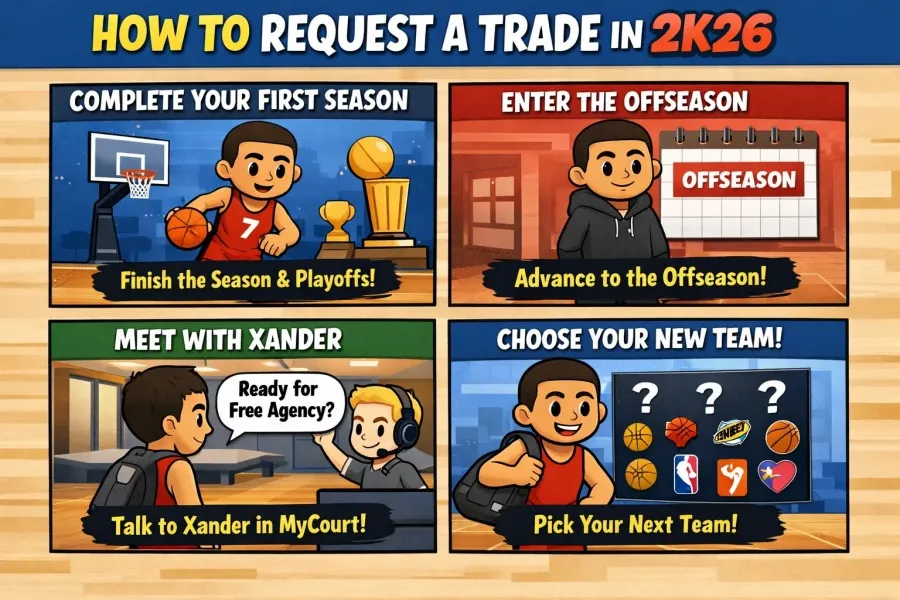
Here's a simple guide on how to change teams in NBA 2K26:
By following these steps and completing the first season, you'll be able to choose your next team in NBA 2K26 and set yourself up for a fresh start!
NBA 2K26's MyCareer mode gives players the chance to live out the dream of going pro—from draft night to becoming a league legend. However, not everyone lands on their ideal team, and the desire to move to a better fit is common. If you're itching to leave the team that drafted you, here's everything you need to know about how to request a trade in NBA 2K26.
No, you cannot request a trade during your rookie or sophomore season. This is a major change in NBA 2K26 due to the new Heart of a Dynasty narrative arc. Unlike previous entries where you could push for a trade right after your rookie year, NBA 2K26 locks you into your drafted team for at least two full seasons.
Here are the conditions that must be met before trade requests are possible:
If your team wins back-to-back NBA Finals in your first two seasons, you unlock the ability to request a trade in your third season. However, this comes with a warning that it may disrupt the Heart of a Dynasty storyline. If you're more focused on team freedom than story progression, feel free to proceed.
If you don't win the Finals twice, your next chance to leave comes when your rookie contract expires. At that point, you'll become a free agent, allowing you to choose a new team (though this is technically not a trade).
After enough time on your current team—usually 3 or more seasons—the option to request a trade becomes available through the MyCareer menu. Once it appears, you can select a preferred destination, and your team will work to make it happen.
Ready to boost your performance and earn more VC fast? Don't forget to buy NBA 2K26 MT and give your MyTeam lineup the upgrade it needs.
Once the option is unlocked, follow these steps:
Keep in mind that your reputation, teammate chemistry, and recent performances can impact how fast and smoothly the trade goes through.
Getting traded in NBA 2K26 is harder than ever, thanks to new narrative and contract restrictions. But if you're determined, either by winning titles or sticking it out for a few seasons, you'll eventually get your shot at joining a new team. Whether you're seeking better teammates, a larger market, or just a fresh start, understanding how trade mechanics work is key to shaping your MyCareer journey.
U4N is a leading online marketplace offering secure, fast transactions for in-game items, currencies, accounts and boosting services. Covering a wide range of popular games, U4N provides players with reliable services, including fast delivery and verified sellers, ensuring a smooth and safe gaming experience.